Picture a ball flying past you at 90% of the speed of light, and a camera taking its photograph. What shape is the ball in the photo? Most people say squashed flat along its direction of motion, and so do many books and videos. A camera would show something else: a round ball, seen from a different angle, as if it had turned, with part of its back in view. This simulator calculates it live in your browser, following our black hole and pulsar. Every image here is calculated from the equations of special relativity, not drawn or animated by hand.
What you’re looking at
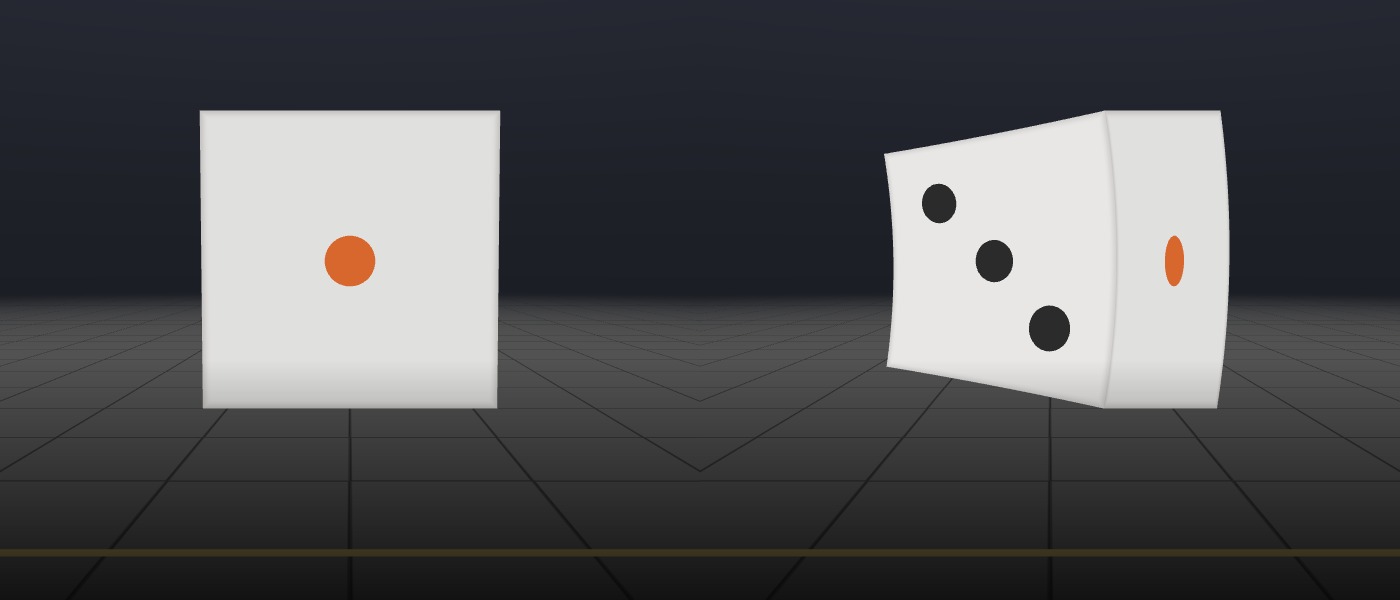
- Two dice, a metre across, flying past 3 metres from the camera. The left one shows how the die looks at an everyday speed; the right one is the same die at 90% of the speed of light. Gold arrows on the floor show which way they are moving. A short label says what to notice, and every setting explains itself when you hold the pointer over it. Other views hold the die in front of you while its speed rises to 99% of light speed, bring it toward you, or swap it for a globe or a see-through cage. You can also choose the speed yourself, from a spacecraft’s to 99.99% of light’s.
- On the globe, a red dot faces you at rest and a gold dot sits on the side that trails behind as it moves. Near light speed the red dot swings to the edge and the gold dot faces you.
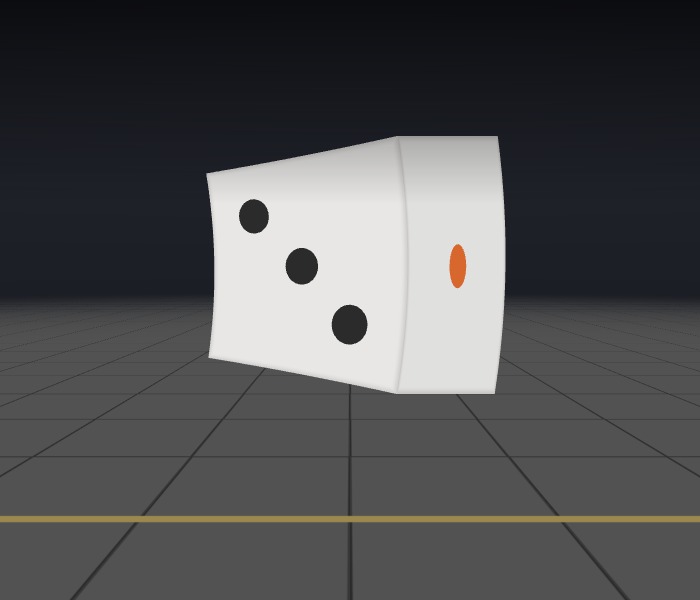
- The object is turned, not squashed. At 90% of light speed, when it appears straight in front of you, the die shows mostly its trailing side, and the face that pointed at you looks under half its width. It never rotates; it only looks turned, by 64° at 90% and 82° at 99%.
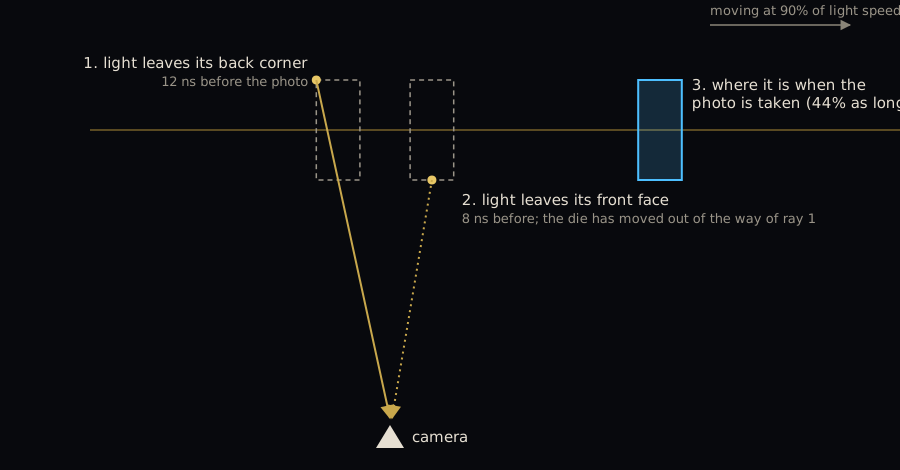
- In the “Where is it really?” view, a blue outline shows where the object really is at the moment of the photo. It is squashed, by the length contraction of special relativity, and it is several metres ahead of the image you see.
- The colour changes. Coming toward you the object looks bluer and brighter, going away redder and dimmer. At 90%, when it appears straight in front of you, white light arrives looking like the orange light of an old bulb, at 1/300 of its brightness; that is why the speeding die turns orange, then red. The simulator evens out the brightness so you can still see it, and says how much it has really changed.
Why turned, not squashed?
Two things happen at once. A moving object really is shorter along its direction of motion: at 90% of light speed, 44% of its length. That is the part the books get right. But a camera does not see an object at one instant. It records the light arriving at one instant, and light from the far side of the object set off earlier, when the object was somewhere else. Light from the trailing side, which would be hidden if the object stood still, left from farther back along the path and still reaches the camera.
For a small or distant object, the two effects combined give almost exactly the view you would have of it at rest from a different angle. A sphere’s outline stays a perfect circle. The angle grows with speed: 6° at 10% of light speed, 30° at half, 64° at 90%.
A mistake that lasted decades
Einstein’s 1905 paper says a moving sphere, “viewed from the stationary system”, is a flattened ellipsoid. He meant measured, but for more than fifty years most people took it to mean seen. George Gamow’s much-loved Mr Tompkins in Wonderland (1940) sends a bank clerk to a dream city where light travels barely faster than a bicycle, and draws its cyclists squashed thin.
Anton Lampa had worked out how a fast rod would really look in 1924, but his paper was largely forgotten. In 1959, independently, Roger Penrose proved that a fast sphere still looks round and James Terrell showed that a small fast object looks turned. The first photographs came in 2025, when a team in Vienna staged the motion with laser flashes and an ultrafast camera, so that light seemed to travel at under 2 metres per second. Their cube and sphere looked turned.
Why nobody has ever seen it
Nothing big moves fast enough. The fastest spacecraft ever built, the Parker Solar Probe, reached 191 km/s around the Sun in 2024. That is 0.064% of light speed, and it would look turned by 0.04°. Particles are another matter: the electrons that drew the picture on an old tube television travelled at about 30% of light speed, and a gold atom’s innermost electrons move at more than half of it. Relativity also reshapes gold’s outer electrons’ orbits, so it absorbs blue light and looks yellow rather than silvery. Relativity reaches your phone too: a GPS satellite’s clock loses about 7 millionths of a second a day because of its speed, and gravity adds more; uncorrected, the clock errors would put your position off by about 10 km a day.
More things the calculation shows
- The image moves faster than light. As the object comes in at 90% of light speed, its image slides along the path at up to 4.6 times light speed, because the light from its successive positions arrives bunched together. Astronomers see this in the jet of the galaxy M87, whose blobs appear to cross the sky at about six times light speed.
- It turns red before it draws level. At 90% of light speed, the object already looks redder when the direction you see it in is more than 51° from its line of approach. Its moving clock runs slow, and that lowers every frequency.
- Straight lines look curved. The bars of the see-through cage bend near light speed. Contraction alone would keep them straight; the travel time of light curves them.
- Coming toward you, you see its back. In the simulator’s “Coming toward you” view, above about 89% of light speed, the die shows the face pointing away from you and hides the one pointing at you.
Animation vs. simulation
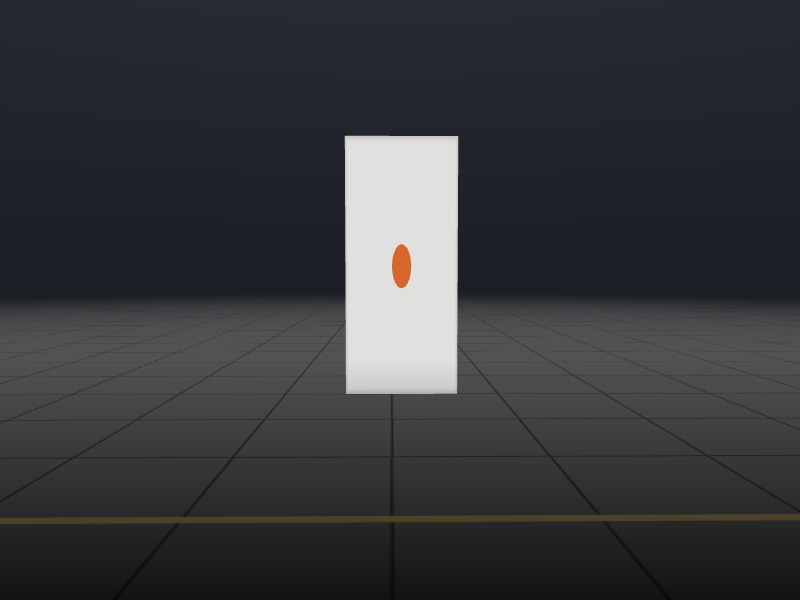
Nothing in the program says “turn the object”. For each pixel, your graphics card follows the light that reaches the camera back in time to the point on the moving object it came from, using the equations of special relativity, then sets the colour from how the motion has shifted that light. The apparent turn, the curved lines and the colours all come out of that one calculation, and each piece of physics can be switched off to see what it does. With light arriving instantly the die is squashed; with no contraction it is stretched and skewed; only with both does it look turned. (The “Speed up” view is a sequence of such snapshots, each of the die moving steadily at one speed, not a single die accelerating.)
Comparing against known results
- An independent check. A separate Python program works the problem out another way, with the squashed object moving along its path. For 2,560 light rays the two agree to a millionth of a millionth of a metre.
- Penrose’s circle. The outline of the moving sphere comes out as a perfect circle, both in the Python program and in the simulator’s own pictures.
- The angle. The turn seen side-on matches Terrell’s formula, arcsin of the speed as a fraction of light’s, at every speed tested.
- Stated limits. The page lists what the model leaves out, including how the object is lit and its colours outside visible light.
Where to view it
It runs on your device’s graphics card and works best on a laptop or desktop. It opens on “Fly past”. Then try “Speed up” to watch more of the back come into view as the speed rises, “Globe speeding up” to watch the dots swap places, “Compare all four” to see the squashed and turned versions side by side, “Where is it really?” for the true position, the “Headlight effect” for the true brightness, or the real speeds list, from the Parker Solar Probe to 99.9% of light speed.
Built with Claude Opus 5.5
I built this with Claude Opus 5.5: the physics design, the GPU code, the test programs that check it, and the write-up. Every image on the page comes from the simulator itself, and the method section gives the equations, the tests and the papers behind them.
I’m sure I’ve gotten some details wrong, so corrections are welcome. The images are free to use, for teaching or anything else, with credit. Try it here.