The Idea in One Picture
It Looks Turned, Not Squashed
Every image on this page is calculated by the simulator from the equations of special relativity and checked against an independent calculation. Nothing is drawn, animated by hand or retouched.
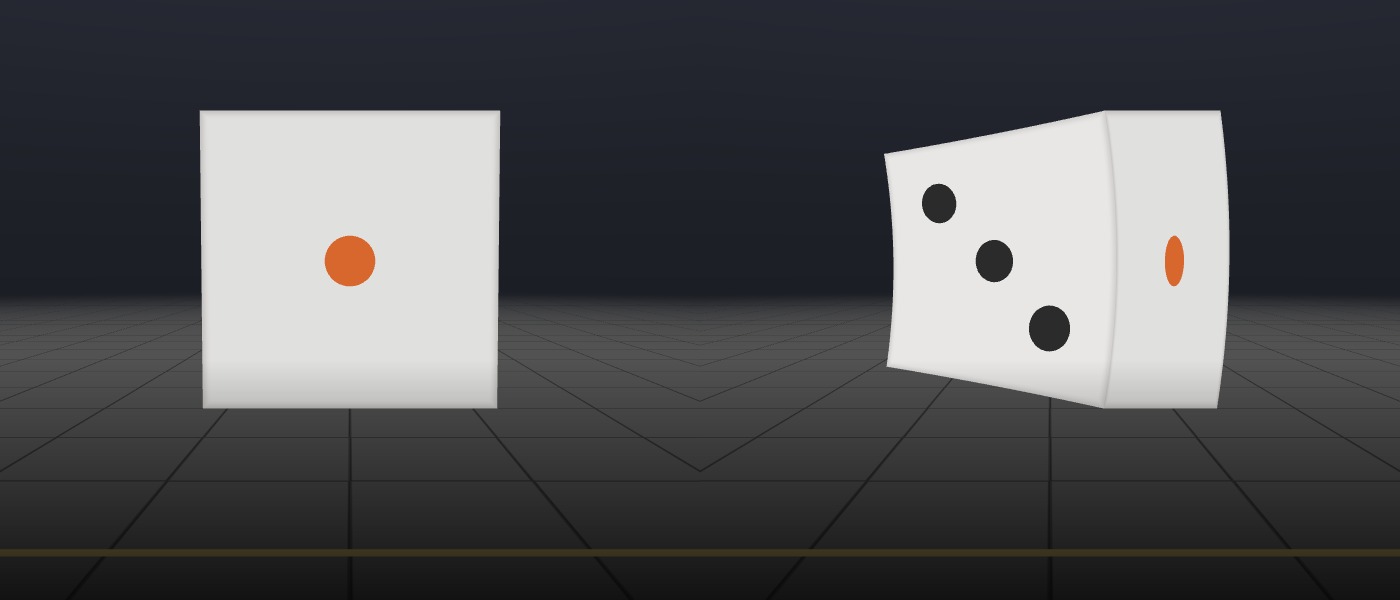
What you would measure: squashed
Special relativity says a moving object really is shorter in the direction it's travelling. At 90% of the speed of light, the die is only 44% as long as it is at rest. This is the picture in most textbooks, and it's correct as a measurement: if you could mark where every part of the die is at one instant, that's the shape you'd get.
What you would see: turned
A camera doesn't record where things are at one instant. It records the light that arrives at one instant, and light from different parts of the die set off at different times. Light from the back left earlier, when the die was farther back, and the die then moved out of its way, so it still reaches the camera. The squashing and these head starts combine into an image that looks like the die has turned around.
How much: it depends only on speed
The faster it goes, the more of its back you see. Seen straight ahead, it looks turned by 6° at 10% of light speed, 30° at half, 64° at 90% and 82° at 99%. The die never actually rotates, and a ball would stay perfectly round; only the side you see changes.
About This Page
A Simulation, Not an Animation
Try this first. A ball flies past you at 90% of the speed of light. You take a photograph as it goes by. What shape is the ball in the photo?
Most people, and most books, say it would be squashed flat in the direction it's moving. It isn't. The photo shows a round ball, seen from a different angle, as if it had turned. You can see part of its back.
In the simulator, two dice about a metre across fly past the camera, 3 metres away. The one on the left is moving at an everyday speed, so it looks just as it would at rest. The one on the right is moving at 90% of the speed of light, and that's where the strange things happen. You can change the speed, and the other views let you hold the die in front of you while it speeds up, send it toward you, swap it for a globe or a wire cage, or compare four versions of the physics side by side. If anything is unclear, hold the pointer over a view, setting or number for a short explanation.
Two effects decide what shape the camera sees. The first is length contraction: a moving object really is shorter in the direction it's travelling, by a factor called γ (gamma) that grows without limit as the speed approaches light's. The second is the travel time of light: light from the far side of the object set off earlier, when the object was somewhere else, yet it reaches the camera together with light from the near side. Put together, these make the object look turned rather than squashed. A third effect, the Doppler shift, changes its colour and brightness.
Calculated, not drawn. Nothing here is an artist's impression or a hand-made animation. For each pixel, your graphics card traces the light back to the moving object using special relativity and works out what colour it should be. There's nothing in the program that says "turn the object"; the apparent turn comes out of the physics, and it agrees with an independent calculation to within a millionth of a millionth of a metre (see Verification below). It runs best on a laptop or desktop. Built with Claude Opus 5.5.
What You're Seeing
Reading the Image
What's on screen
The left die is moving at an everyday speed and the right die at 90% of light speed. Both are heading to the right, as the gold arrows on the floor show. The left die is kept level with the fast one so you can compare them, and the floor itself isn't moving. The camera turns to follow the dice, the way you'd follow a passing car.
Not squashed, not rotating
When the fast die appears straight in front of you, its front face looks less than half as wide as it should, and the side with three pips faces you. The delay in the light makes up exactly for the contraction, so the die looks its normal size, just seen from a different angle. A ball would stay perfectly round, as Roger Penrose proved in 1959.
You can see its back
If the die were standing still where it appears, its trailing face would be edge-on and invisible to you. At this speed, light leaving that face heads back along the path, and the die moves out of its way before it can block it, so the light reaches you.
It isn't where it looks
The light you're seeing left the die 10 billionths of a second ago, and in that time it has moved another 2.7 metres. The "Where is it really?" view outlines its true position in blue. Sunlight works the same way: the Sun you see is the Sun as it was 8.3 minutes ago.
Red before it draws level
Coming toward you, the die looks bluer and brighter; moving away, redder and dimmer. You might expect it to change over as it passes, like an ambulance siren dropping in pitch, but it turns red much earlier: at 90% of light speed, as soon as you see it more than 51° from its line of approach. That's because its clock runs slow. When it's straight in front of you, every frequency of its light is lowered to 44% (14% at 99%), which is why the fast die looks orange.
An image faster than light
As the fast die comes in from the left, its image slides along at up to 4.6 times the speed of light. Nothing is breaking the speed limit: light from its later positions has less distance to travel, so it arrives bunched together. Astronomers see the same thing in the jet of the galaxy M87, where blobs appear to cross the sky at about six times the speed of light.
Straight lines curve
The wire cage is built from straight bars, but near light speed they look curved. Contraction on its own would keep them straight; it's the delay in the light, which is different for each part of a bar, that bends them.
Coming toward you, you see its back
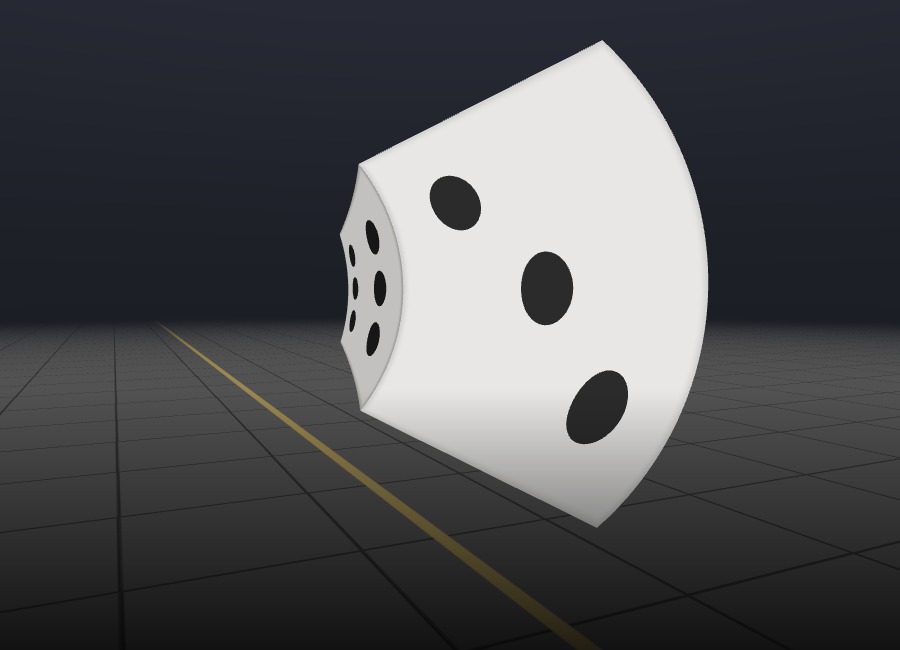
In the "Coming toward you" view at 97% of light speed, the die shows you the face that points away from you (six pips) and hides the one pointing at you. On this path, that starts happening above about 89% of light speed.
A spinning clock
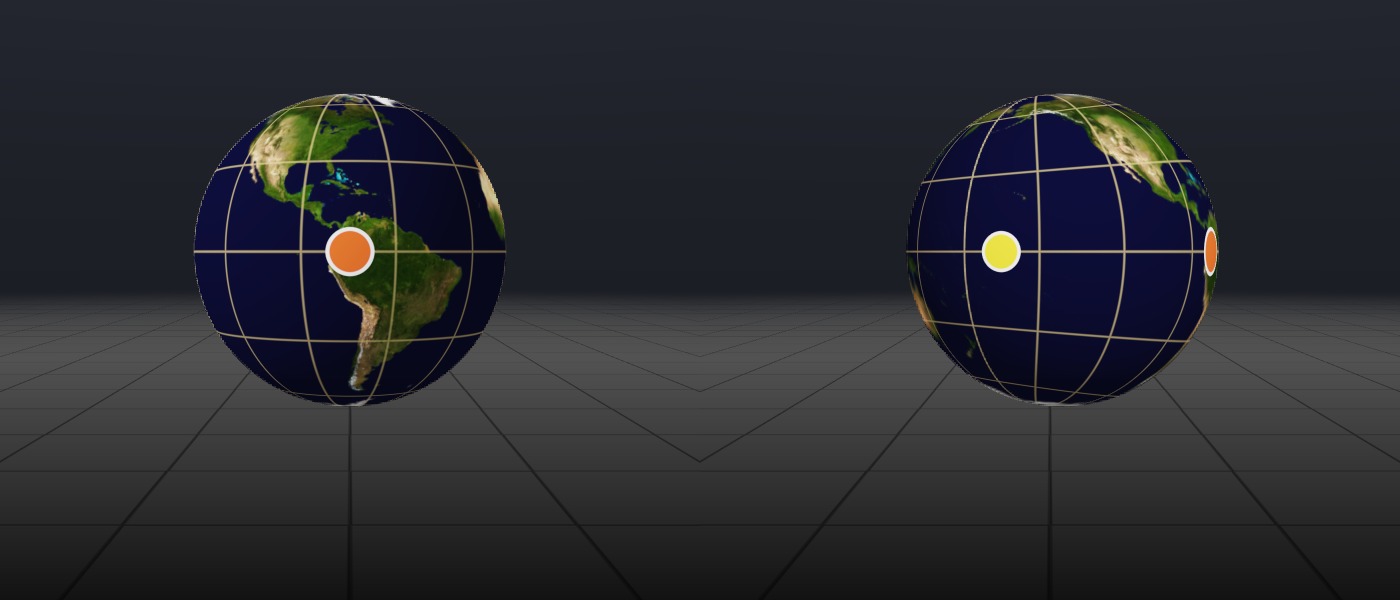
In the spinning globe view, the globe turns once every 60 billionths of a second of its own time. It seems to spin faster as it comes toward you and slower as it moves away, by the same factor that shifts its colour. Straight in front of you at 90%, it turns 2.3 times slower than its own clock says.
In Everyday Terms
Why Nobody Has Ever Seen This
The workings for each number are in the notes under References. At 90% of light speed, you could cross from New York to Los Angeles in 15 thousandths of a second.
At a Glance
The Numbers Behind the Image
A Long-Lived Mistake
Squashed or Turned?
Einstein's 1905 paper says that a sphere in motion, "viewed from the stationary system", has the form of a flattened ellipsoid. He meant measured: where every part of it is at one instant. For more than fifty years, most people took it to mean what you would actually see. The best-known picture is George Gamow's Mr Tompkins in Wonderland (1940), in which a bank clerk dreams of a city where light travels barely faster than a bicycle, and the cyclists look squashed thin.
In 1924 the Austrian physicist Anton Lampa had already worked out how a fast-moving rod would really look, but few people noticed. In 1959, independently, Roger Penrose proved that a fast sphere still looks round, and James Terrell showed that small fast objects look turned. Victor Weisskopf brought the result to a wide audience the following year.
The first photographs of the effect came in 2025, from a team at TU Wien and the University of Vienna. They moved a cube and a sphere in small steps, lit them with very short laser flashes and recorded them with an ultrafast camera, so that light effectively travelled at under 2 metres per second. The objects looked turned, not squashed.
Controlled Experiments
Switch Off the Physics, One Effect at a Time
Each comparison below changes just one thing, so you can see what each piece of physics does. Every image was rendered by the simulator, and you can recreate all of them yourself.
Four questions
The same die at 90% of light speed, at the moment it's really straight in front of the camera, with colour shifts switched off so only the shape differs. What if light arrived instantly and nothing contracted? What if light were instant but the die still contracted? What if light took time but nothing contracted? Only the last one, full relativity, is what a camera would actually record.
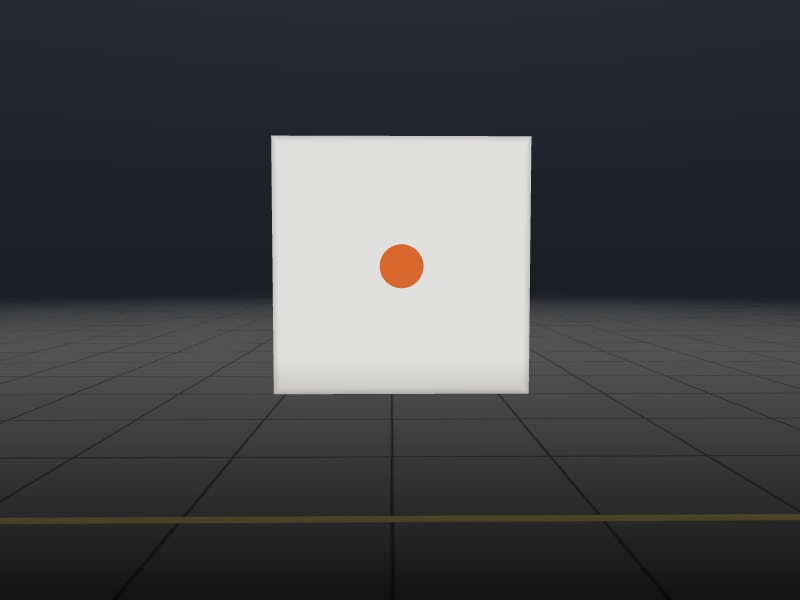 Light instant, no contraction: the die as it is at rest
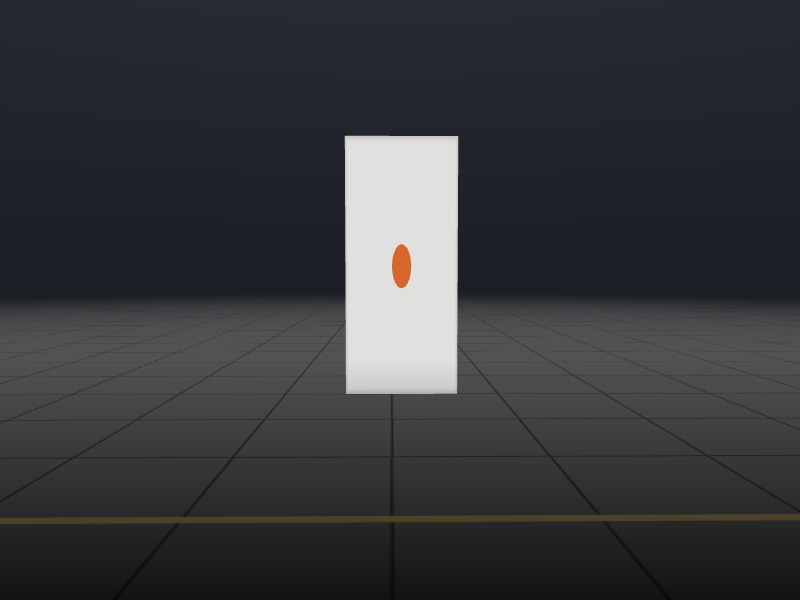 Light instant, with contraction: what you would measure (44% as long)
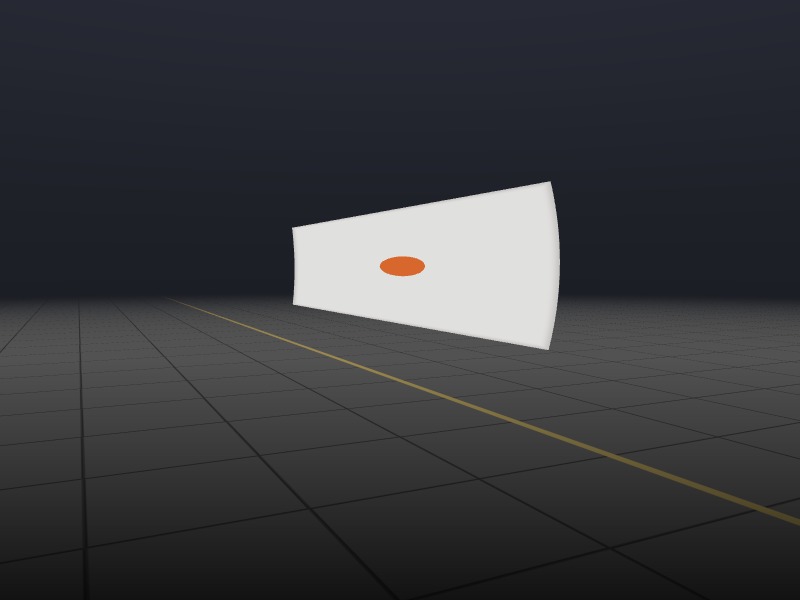 Light takes time, no contraction: stretched and skewed
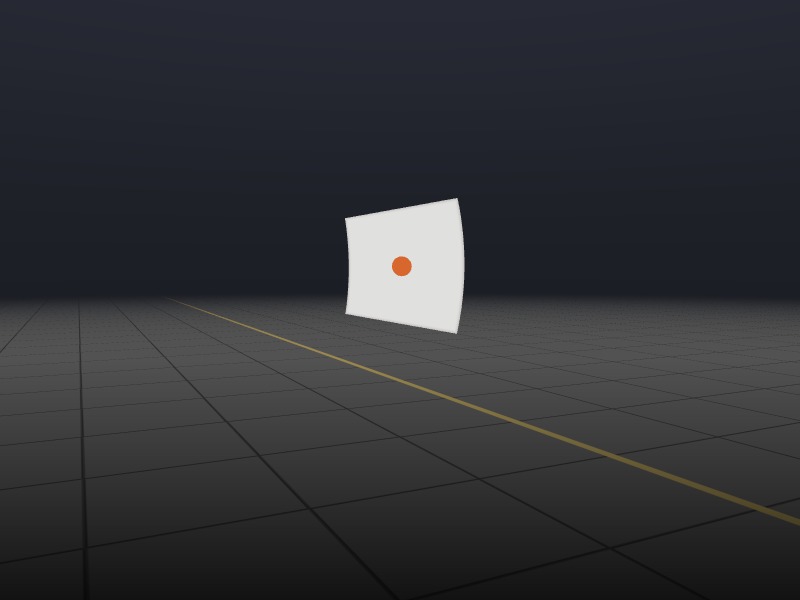 Full relativity: seen face-on although it's far to the left, so it looks turned by 64°
Speed
The die at the moment its image is straight in front of the camera, at four speeds. It looks turned by 6° at 10% of light speed, 30° at half, 64° at 90% and 82° at 99%, by which point you're looking almost straight at its trailing face.
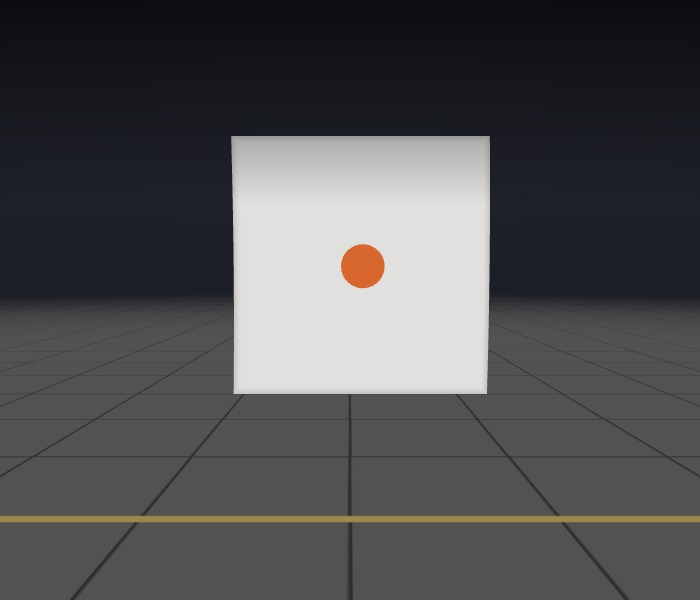 10%
10%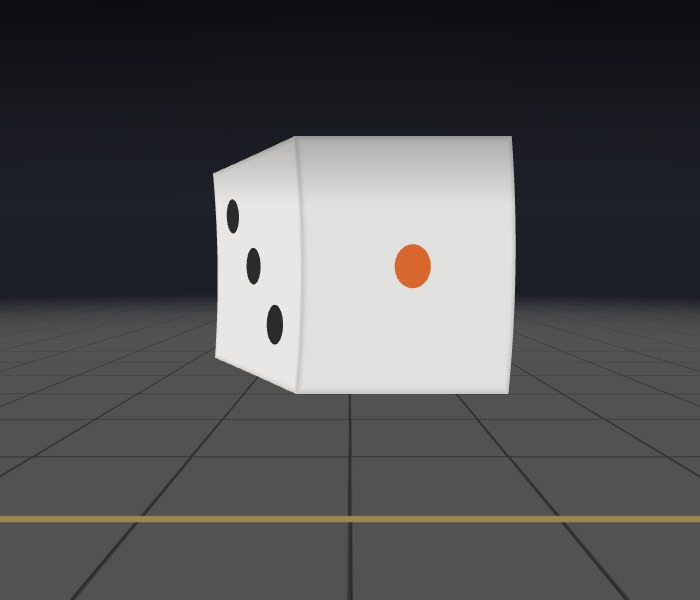 50%
50%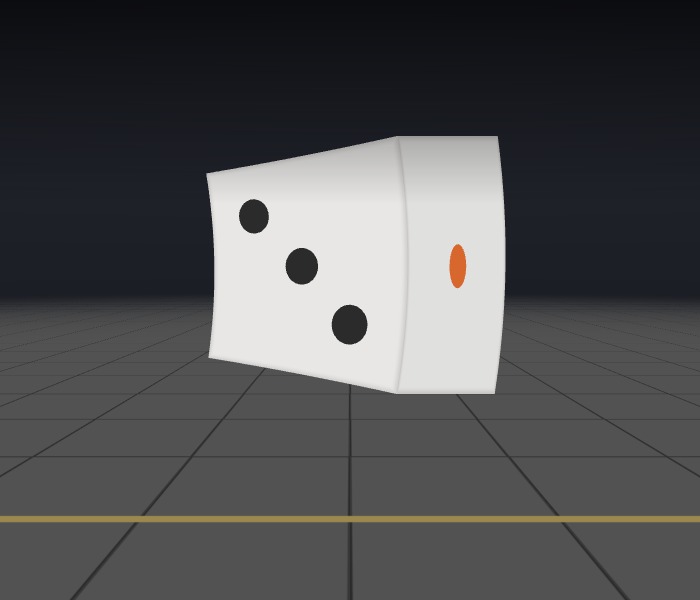 90%
90%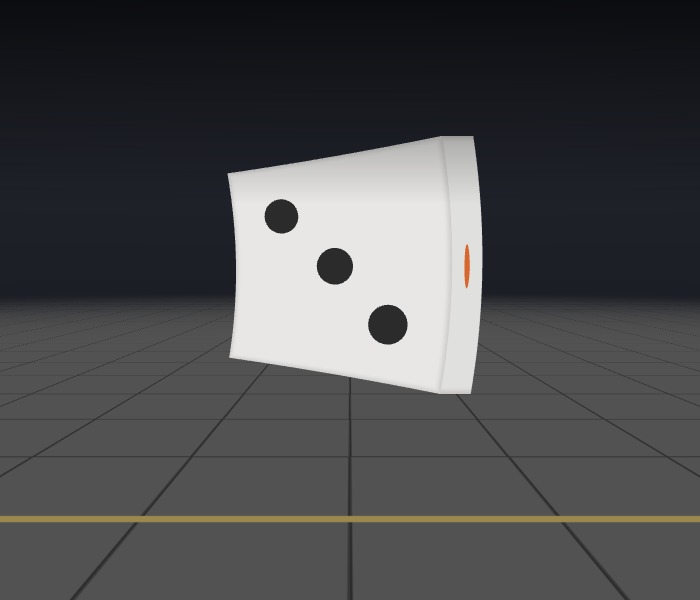 99%
99%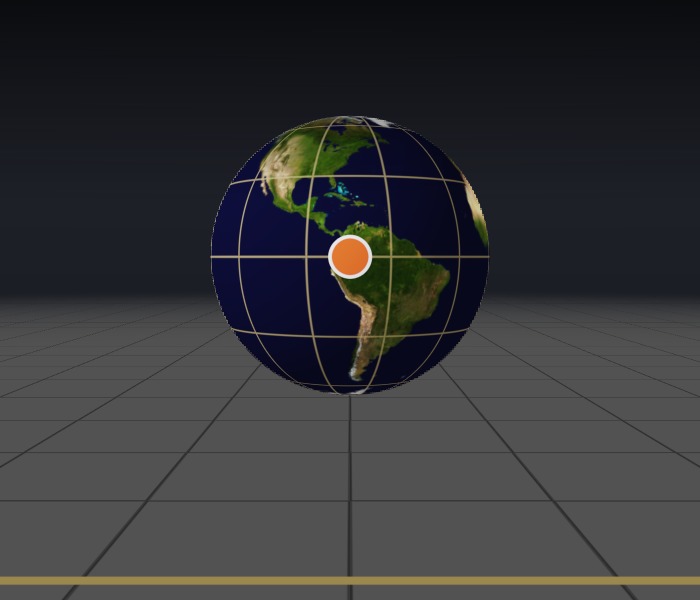 At rest
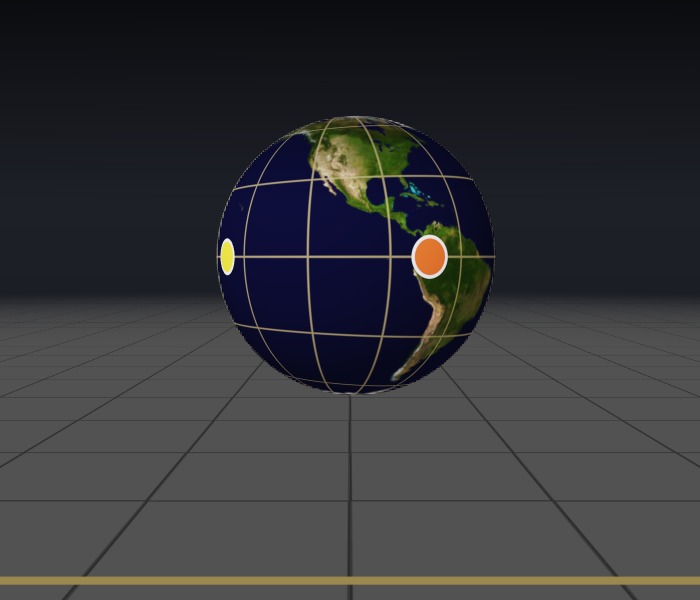 50%
50%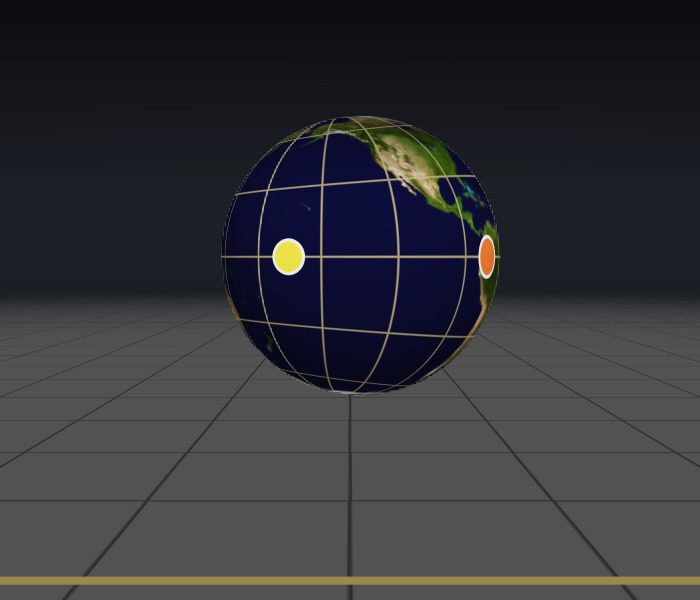 90%
90%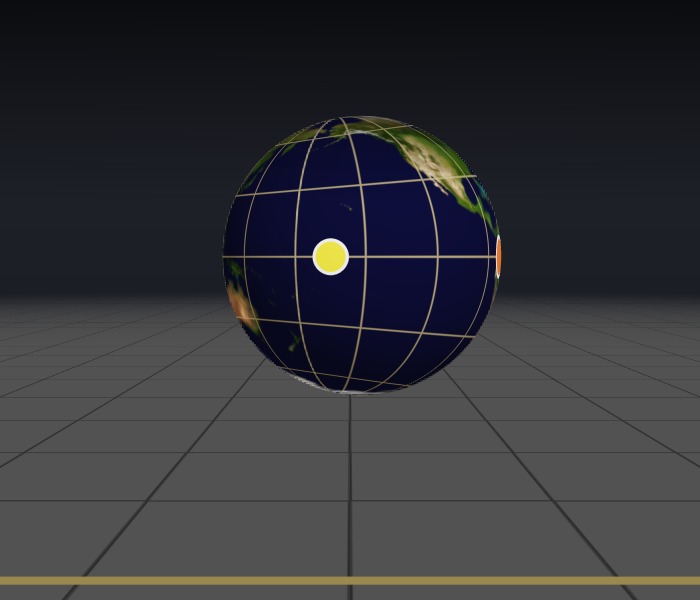 99%
99%The travel time of light
The wire cage at 90% of light speed. If light arrived instantly (left), the cage would be contracted but its bars would stay straight. With the real travel time of light (right), the bars curve.
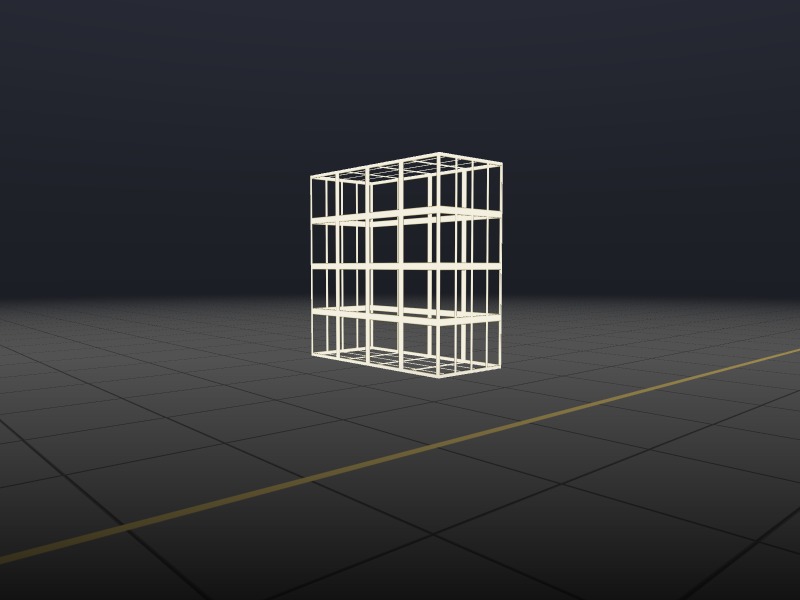 Light instant, with contraction
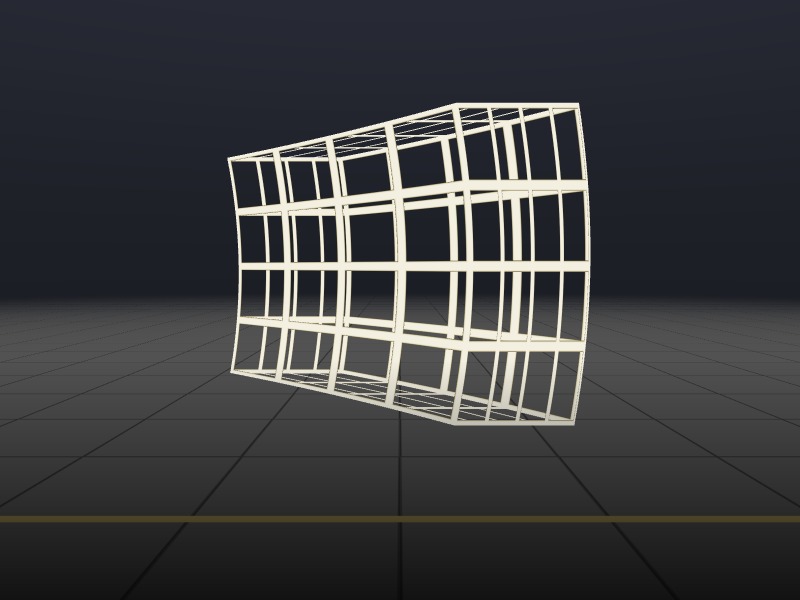 Full relativity
The headlight effect
The globe's true brightness at 60% of light speed, with nothing evened out. As it approaches, it looks 3.6 times brighter than it would at rest, and bluer. Straight in front of you, it's down to a third of its brightness at rest. Once it's 3 metres past, it's down to a thirtieth, and as red as a 3,300 K lamp. A fast object throws its light forward like a headlight, which is also why one side of the disk on our black hole page is so much brighter.
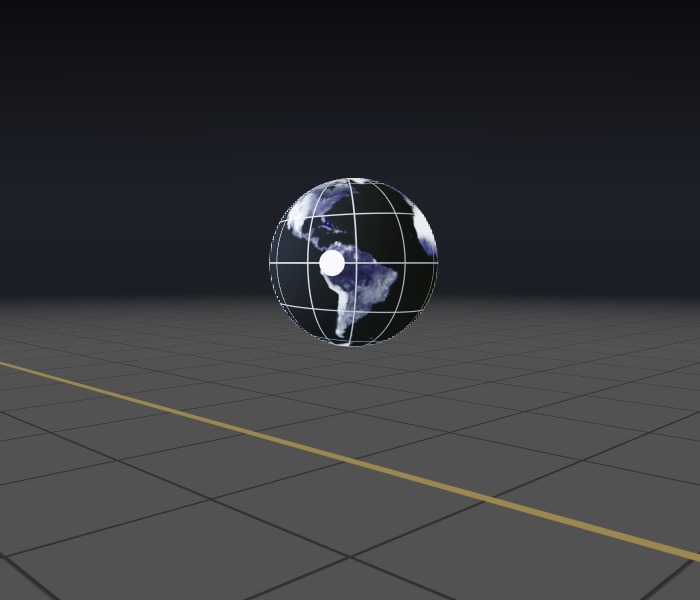 Approaching: 3.6× brighter than at rest
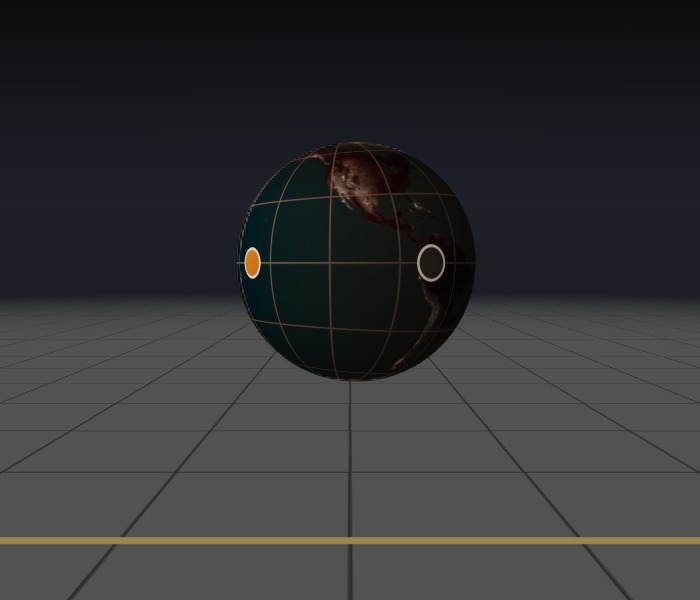 Straight ahead: a third as bright
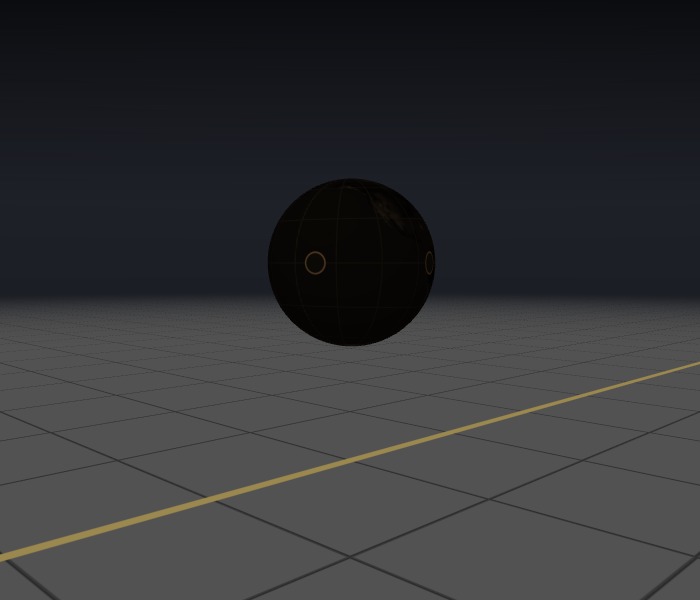 Moving away: a thirtieth as bright
Coming toward you
The die heading toward the camera at 97% of light speed, passing 1.4 metres to one side, just after it has really drawn level with you (colour shifts are off). The face with six pips points away from you, yet it's in view, while the face with one pip, pointing straight at you, is hidden. The die also looks stretched along its path rather than shortened.
Method
How Each Pixel Is Computed
- Follow the light back in time. The camera is at rest and the photo is taken at time 0. Light reaching it from direction d was, a time λ/c earlier, at distance λ along d. With c = 1, its path is x = λd, t = −λ.
- Move into the object's frame. The object moves at velocity v = βv̂, with γ = 1/√(1 − β²). A Lorentz transformation turns the light's path into a straight line in the object's own frame, where the object is at rest and has its ordinary shape:
d′ = d + [(g − 1)(d·v̂) + g β L] v̂, x′c = x0 + (g − 1)(x0·v̂) v̂with g = γ and L = 1 for full relativity. x0 is where the object's centre really is at time 0, and x′c where it is in its own frame. The first point where the line λd′ meets the object is the point the pixel shows. Setting g = 1 switches length contraction off and L = 0 makes light instant, which gives the four questions above. This change of direction is the aberration of light, the effect James Bradley discovered in starlight in 1725–28.
- Shift the colour. The light's frequency is multiplied by the Doppler factor
D = 1 / [γ (1 + β d·v̂)],which includes both the ordinary Doppler shift and the slowing of the moving object's clock. Because Iν/ν³ is the same for every observer, the spectrum that arrives is Iλ(λ) = D5 Iλ,emitted(Dλ): the light shifts in wavelength and changes in brightness together.
- Colour it. The object is lit by a lamp that travels with it, a 5,800 K blackbody like sunlight, shining from behind, above and the camera side, with some fill light. Each surface colour is turned into a smooth reflectance spectrum built from three overlapping curves that add up to a perfect white. The shifted spectrum is integrated against the CIE 1931 colour-matching functions, from a table your browser computes at startup, and the camera is white-balanced so sunlight looks white. A white surface seen with Doppler factor D then looks exactly like a blackbody at D × 5,800 K.
- Display it. The camera has an ordinary lens and turns to follow the object's image, so the outline isn't stretched the way an ordinary lens stretches things near the edge of a wide picture. "Even out brightness" is a viewing aid that keeps the object visible as it dims; the true change in brightness is shown under Right now.
- The comparison die and Speed up. The die on the left is drawn at rest (at everyday speeds it looks the same), at the position where the fast die appears, without colour shifts. In the "Speed up" view, each frame is a separate snapshot of the die moving steadily at one speed, and the speeds are chosen so the apparent turn rises from 0° to 82° and back over 18 seconds.
Verification
A separate Python program works the problem out a different way, in the camera's frame, treating the object as a contracted shape moving along its path. The two agree, and the simulator's graphics code is checked against its own pictures.
| Test | Result |
|---|---|
| 2,560 light rays, sphere and box, four modes, speeds 10–99%: hit or miss, distance, point hit | All agree; largest difference 4 × 10⁻¹³ m |
| Doppler factor vs an explicit Lorentz boost of the light | Agree to 4 × 10⁻¹⁶ |
| Turn seen side-on, 30–99% of light speed | arcsin β to 7 digits; small-cube fit in the reference also gives arcsin β |
| Penrose's circle: outline of a moving sphere, 9 positions and speeds (reference) | A circle on the sky to 10−14; without the travel time of light it is not |
| Rendered globe outline (graphics card), 3 speeds × 3 positions | Round to within 0.4% (pixel edges); with light instant, the predicted ellipse within 0.6% |
| White surface at Doppler factor D vs a blackbody at D × 5,800 K | Agree to 10−13 |
Limits
What This Model Leaves Out
- The lighting. The lamp travels with the object, so the object effectively shines with its own light, as in Penrose's and Terrell's calculations. Light from a lamp standing in the room, reflected off a moving surface, would add effects of its own; the 2025 experiment used light like that.
- Colours outside the visible. At high speed, the light you see left the object as ultraviolet or infrared. We assume each surface reflects there as it does at the nearest visible colour, and the colours are built from three smooth curves rather than measured spectra. Brightness ratios for a white surface are exact.
- An ideal snapshot. The camera records all the light arriving at one instant, through a pinhole. Real cameras and eyes take longer and have lenses of finite size.
- The spinning globe. At its spin rate, the globe's equator moves at 17% of light speed, and the colour shifts and aberration from that motion are left out.
- Steady motion. In every frame the object moves in a straight line at a constant speed and is perfectly rigid. The "Speed up" view is a series of such snapshots at different speeds, not one object accelerating; a real object speeding up or turning would add effects of its own.
- The everyday-speed die. The die on the left is a reference drawn beside the fast one so you can compare them. It's shown as it looks at rest and kept level with the fast die's image; a real slow die would fall far behind.
- Only the fraction of light speed matters. The scene is room-sized, but the same images would apply to a spacecraft passing at the same speed and a proportionally larger distance. Objects this size never reach these speeds; particles do.
- The room. The floor is at rest and drawn without any relativistic effects, as a reference. Nothing casts shadows or reflections.
Sources
References
- Einstein, A. (1905). Zur Elektrodynamik bewegter Körper. Annalen der Physik, 17, 891–921 (§4). DOI
- Lampa, A. (1924). Wie erscheint nach der Relativitätstheorie ein bewegter Stab einem ruhenden Beobachter? Zeitschrift für Physik, 27, 138–148. DOI
- Gamow, G. (1940). Mr Tompkins in Wonderland. Cambridge University Press.
- Penrose, R. (1959). The apparent shape of a relativistically moving sphere. Proceedings of the Cambridge Philosophical Society, 55, 137–139. DOI
- Terrell, J. (1959). Invisibility of the Lorentz contraction. Physical Review, 116, 1041–1045. DOI
- Weisskopf, V. F. (1960). The visual appearance of rapidly moving objects. Physics Today, 13(9), 24–27. DOI
- Hornof, D., Helm, V., de Dios Rodriguez, E., Juffmann, T., Haslinger, P., & Schattschneider, P. (2025). A snapshot of relativistic motion: visualizing the Terrell–Penrose effect. Communications Physics. arXiv:2409.04296
- Nowojewski, A. (2005). Gamow's bicycle: the appearance of bodies at relativistic speeds and apparent superluminal velocities. arXiv:physics/0512054
- Rybicki, G. B., & Lightman, A. P. (1979). Radiative Processes in Astrophysics, chapter 4 (relativistic Doppler shifts and beaming). Wiley.
- Biretta, J. A., Sparks, W. B., & Macchetto, F. (1999). Hubble Space Telescope observations of superluminal motion in the M87 jet. The Astrophysical Journal, 520, 621–626. DOI
- Ashby, N. (2003). Relativity in the Global Positioning System. Living Reviews in Relativity, 6, 1. DOI
- Pyykkö, P. (1988). Relativistic effects in structural chemistry. Chemical Reviews, 88, 563–594. DOI
- Wyman, C., Sloan, P.-P., & Shirley, P. (2013). Simple analytic approximations to the CIE XYZ color matching functions. Journal of Computer Graphics Techniques, 2(2), 1–11. Link
- Earth map: Blue Marble: Land Surface, Shallow Water, and Shaded Topography (2002). NASA Goddard Space Flight Center image by Reto Stöckli (land surface, shallow water, clouds); enhancements by Robert Simmon (ocean color, compositing). NASA Earth Observatory
Notes on the everyday numbers: Parker Solar Probe's top speed of 191.2 km/s (December 2024) is 0.064% of light speed, a turn of arcsin(0.00064) = 0.04°. A pass from 6 m before to 6 m after the camera, 12 m of path, takes 12 m ÷ (0.9 × 3 × 108 m/s) = 44 ns. Electrons accelerated through 25 kV have γ = 1.049, a speed of 0.30 c. A GPS satellite moves at 3.87 km/s, so its clock runs slow by 1 − 1/γ = 8.3 × 10⁻¹¹, 7.2 µs a day (gravity makes it run fast by about 45 µs, more than cancelling it). Gold's 1s electrons move at roughly Zα = 79/137 = 0.58 c. An LHC proton at 6.8 TeV has γ = 7,250, a turn of 89.992°. The 1991 "Oh-My-God" cosmic ray, 3.2 × 10²⁰ eV, if a proton, has γ = 3.4 × 10¹¹; over a light-year it falls 1/(2γ²) of the distance behind light, 41 nm. GPS: about 38 µs a day of net clock error, times light speed, is about 11 km. New York to Los Angeles, 3,940 km, at 0.9 c: 15 ms.
Use These Images
Free to Use, With Credit
Images and recordings you make with this simulator, and the figures on this page, may be used for any purpose, including teaching, publication and commercial work, without asking permission. We only ask that you credit Frosty Wren Studios, for example:
Fly-By simulation: Frosty Wren Studios, frostywren.com/light-speed-fly-by"Save image" adds this line to the corner of each picture by default; you can switch it off under Playback and output. The simulator's source code is not covered by this permission.